The Comet ToDo icon: a white check mark in a rainbow ring on a starry sky Free beta · iPhone, iPad, Mac and Android

Comet ToDo

A calm, private to-do app with a night-sky look.

It shows what matters today, keeps you from losing anything by accident, and uses on-device AI only where it saves you typing.

Join the beta on TestFlight
https://testflight.apple.com/join/DXczWgmJ

On Android? It's tested through Google Play. Here's how to join.

What's new in 1.8.2 →
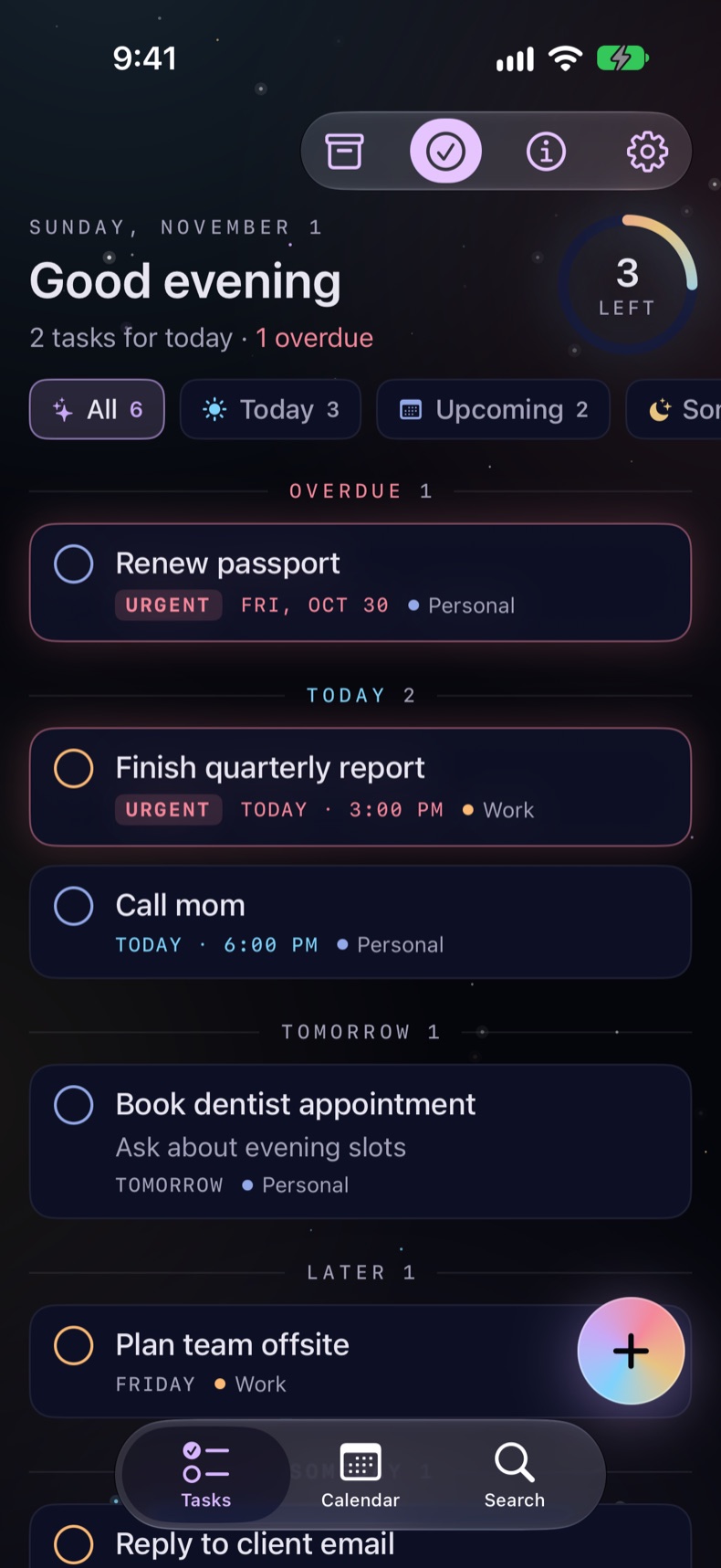
The main screen: a greeting, today's summary and progress ring, filter chips, and tasks grouped by Overdue, Today, Tomorrow and Later

Everything it does

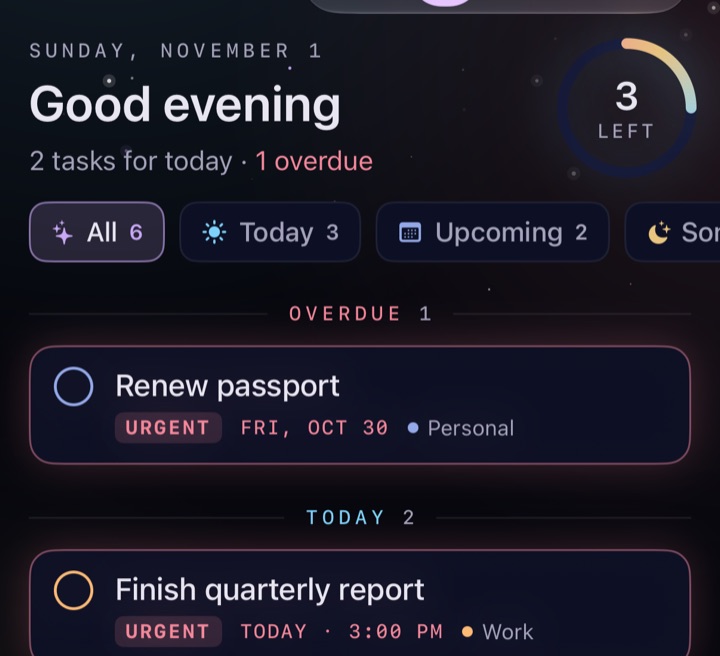
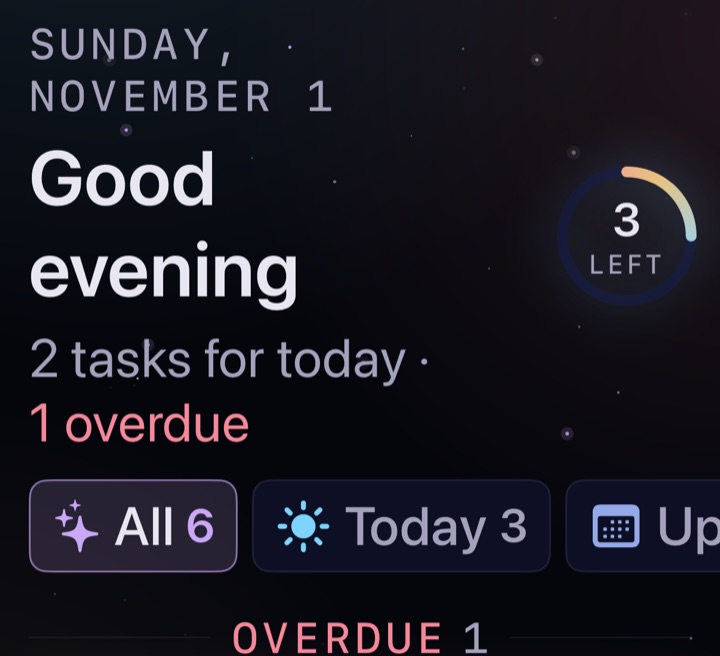
The top of the main screen: Good evening, 2 tasks for today and 1 overdue, a ring showing 3 left, and filter chips

Your day at a glance

A greeting, a one-line summary and a progress ring. Filter by All, Today, Upcoming, Someday, Urgent or a list.
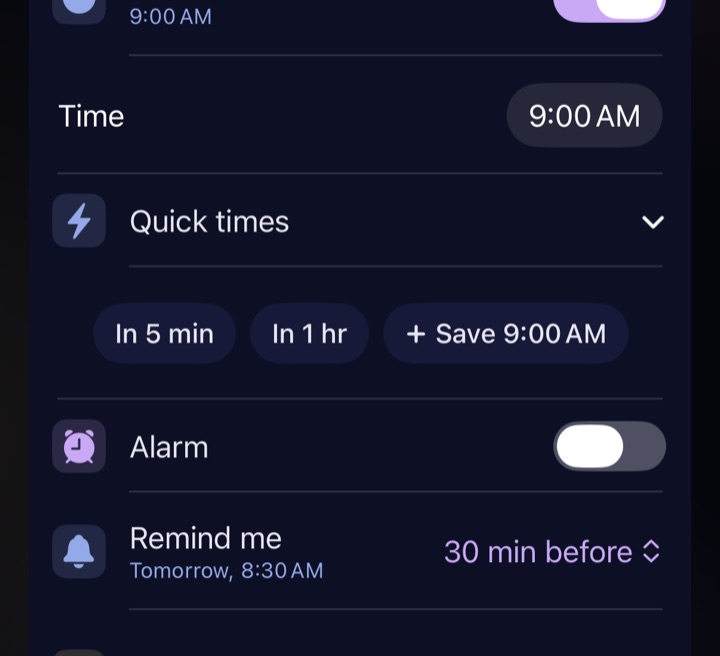
A task's details with a time of 9:00 AM, an Alarm switch, and Remind me set to 30 minutes before

Reminders and alarms

A notification at the due time or earlier, with Complete and Snooze buttons. Alarm rings full screen, even on silent, with a tone you pick for each task.
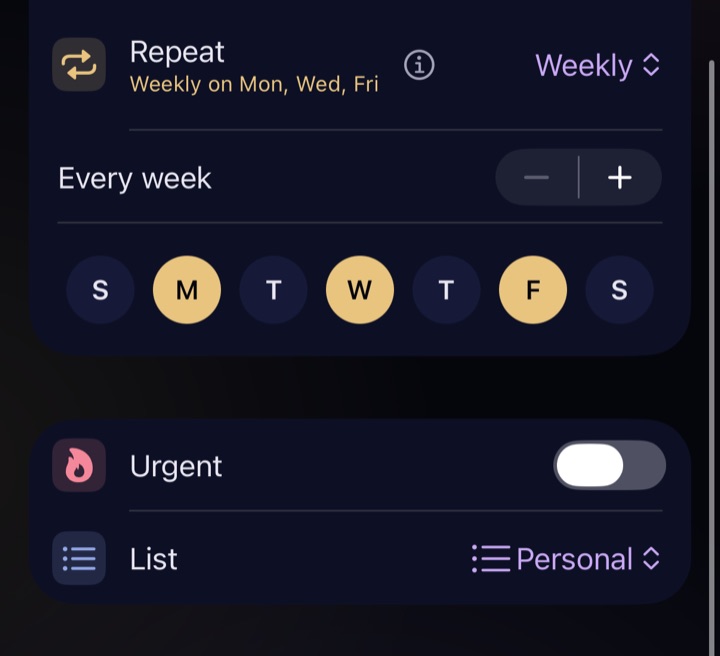
Repeat set to Weekly on Mon, Wed and Fri, with the three days lit up

Repeats

Daily, weekly on the days you pick, or monthly. Complete one and the next appears.
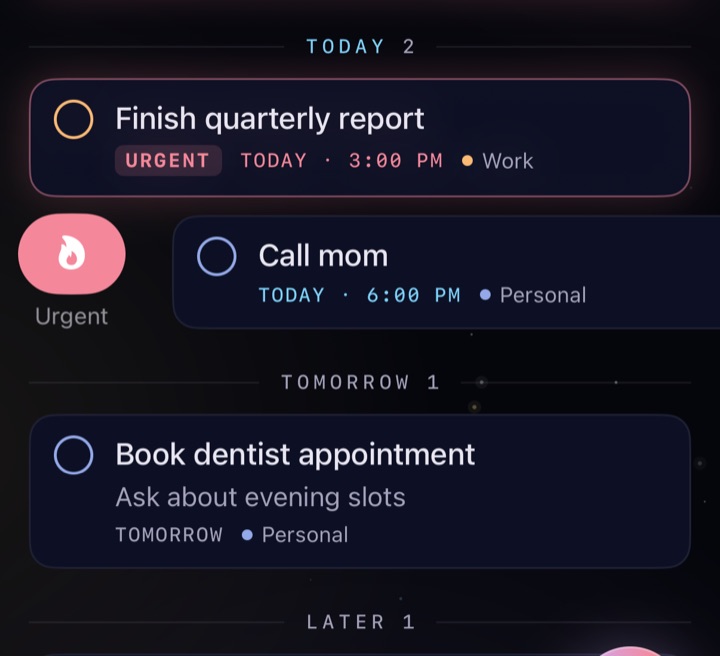
A task swiped to the right, showing the pink Urgent button, above and below tasks marked Urgent

Urgent

Swipe right or type !. An urgent task with no date counts as today's until it's done.
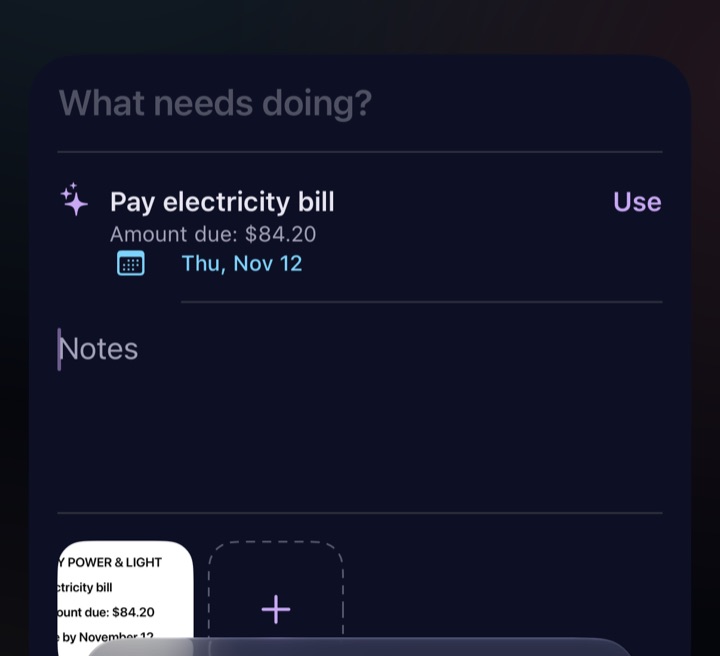
A new task with a bill attached and a suggested title, Pay electricity bill, with the amount and a due date of Thu, Nov 12

Notes, attachments and suggestions

Add photos, PDFs and files. On-device AI suggests a title: a to-do for a bill, or "Photo of a cardinal" for a photo.
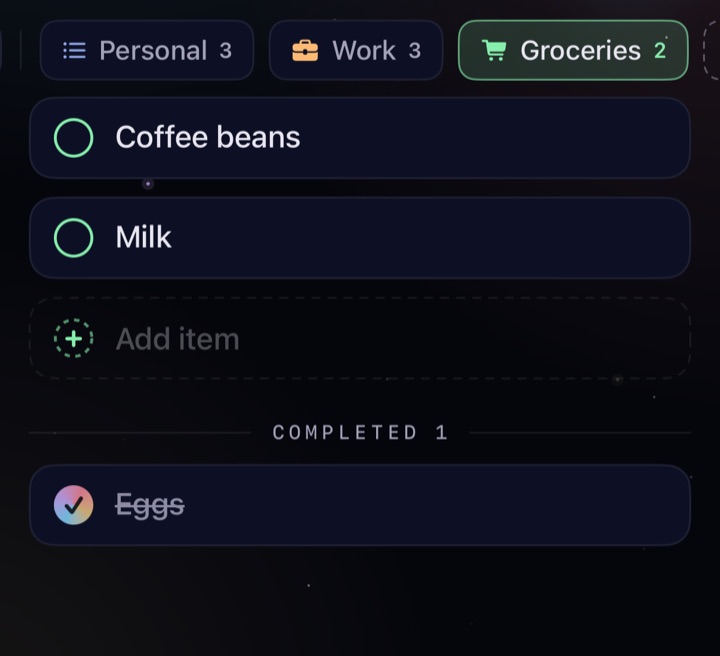
The Groceries checklist: Coffee beans and Milk, an Add item line, and Eggs crossed off

Lists and checklists

Lists with their own color and icon. A checklist is for plain items: type, press Return, type the next. Press and hold a list to edit it.
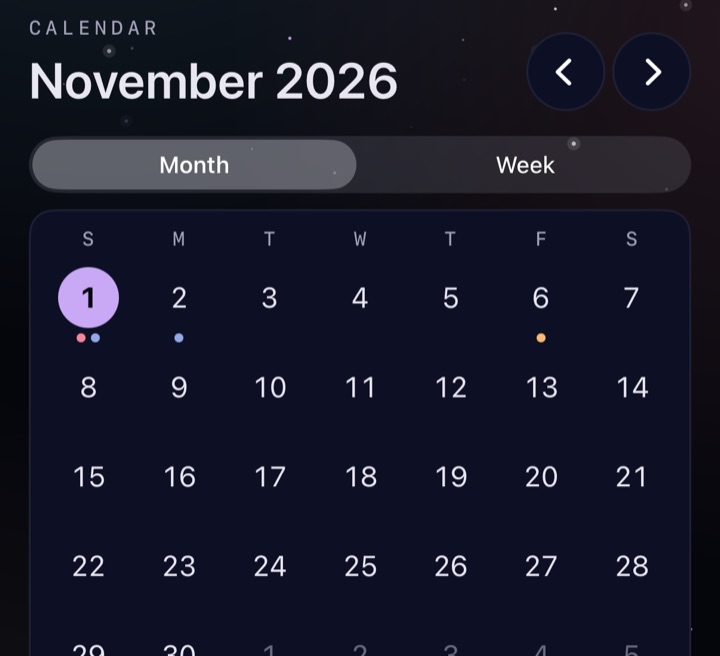
The calendar tab: November 2026 as a month grid, with dots under days that have tasks

Calendar and search

Month and week views; drag a task to another day. Pick which calendars' events show alongside, and make a task from any event. Search covers notes and the Archive too.
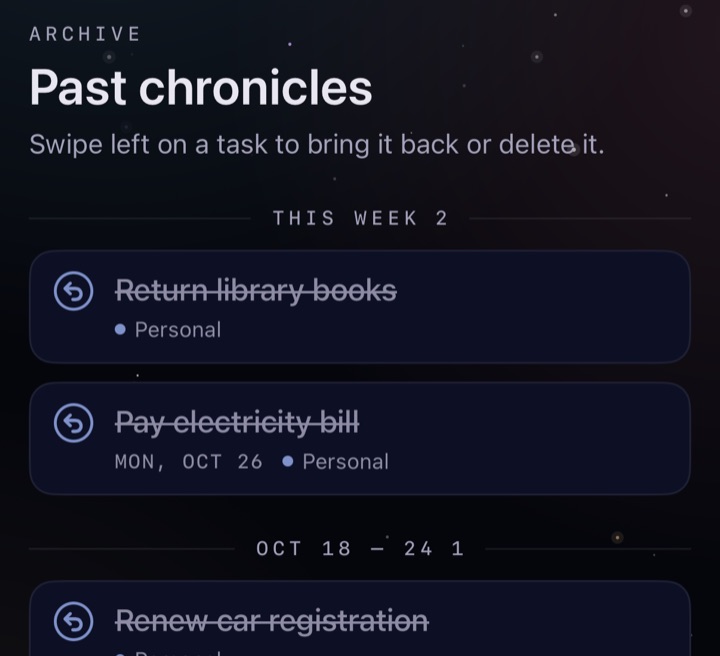
The Archive, titled Past chronicles: finished tasks grouped by week, each with a restore button

Archive, with undo built in

Finished tasks move here on their own, grouped by week. Restore anything with a swipe. Deleting for good only happens here.
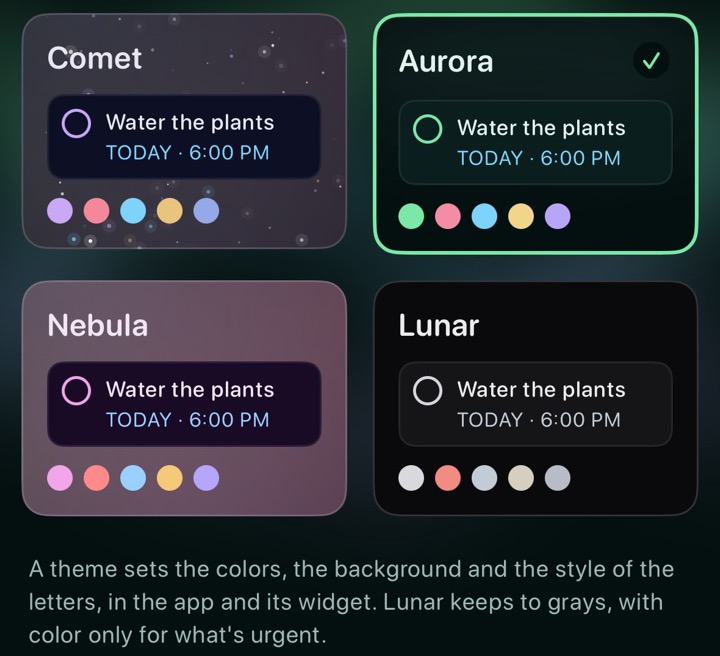
The Theme screen: Comet, Aurora (picked), Nebula and Lunar, each with a sample task in its own colors

Themes, or your own

Five looks, from the starry Comet to the light Daylight, or make one from a color or a photo of yours. Text stays readable whatever you pick.
The main screen at a very large text size, still fitting the greeting, summary and chips

Any text size, plus widgets

Works at every text size, in landscape and with VoiceOver or TalkBack, and buttons can be Large or Extra Large. A Today widget for the Home Screen, and the Lock Screen on iPhone.

Type it like you'd say it

Write the task in plain words. Chips under the title show what Comet ToDo understood; tap one to keep those words as text instead.
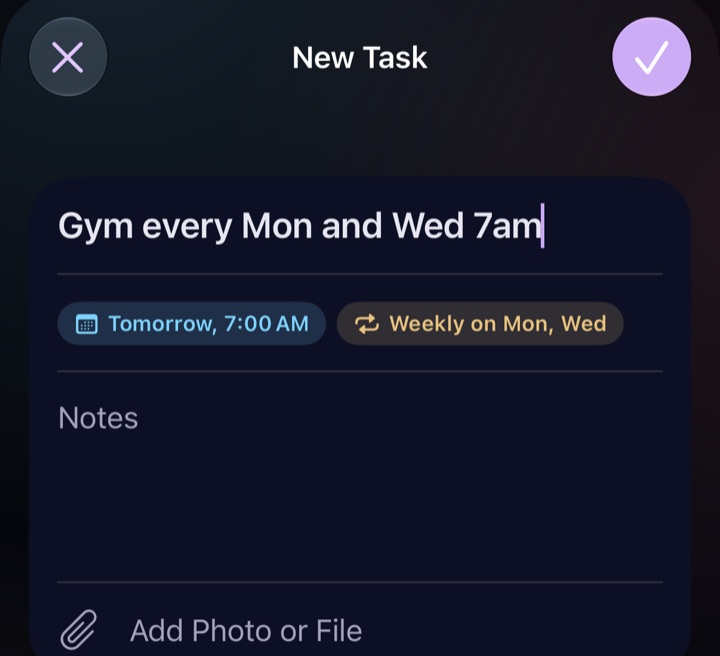
A new task typed as Gym every Mon and Wed 7am, with chips reading Tomorrow, 7:00 AM and Weekly on Mon, Wed
You typeYou get
Call mom Friday 6pmFriday, 6:00 PM
Water plants every other dayEvery 2 days
Renew passport !urgentUrgent
Dentist Tuesday 9am alarmTuesday, 9:00 AMAlarm
Send invoice #WorkWork list

Why Comet ToDo

It gets to the point

Open it and today is right there: what's overdue, what's due, and a ring showing how much is left.

It's hard to lose things

A swipe archives instead of deleting, and the Archive works like a Trash you can restore from.

It stays lean

One "this matters" marker (Urgent), not flags plus priorities plus stars.

It's private

No account, no servers, no tracking. Your tasks stay on your device.

It's smart without taking over

Quick add reads dates as you type, and it always shows what it understood before anything changes.

Getting it

Install on iPhone, iPad or Mac

  1. Get Apple's free TestFlight app from the App Store.
  2. Open the beta link on your iPhone, iPad or Mac.
  3. Tap Accept, then Install.

Install on Android

  1. Send Jason the email address of the Google account on your phone, so he can add you as a tester.
  2. On your phone, open the Android testing link and tap Accept invite.
  3. Tap Download test app, then Install in Google Play.

Google Play keeps it up to date, like any other app.

Update on iPhone, iPad or Mac

  1. Open TestFlight and tap Comet ToDo.
  2. Tap Update. Or turn on Automatic Updates there and never think about it.

Your tasks stay put when you update.

What you need

  • iPhone or iPad on iOS 27, or a Mac with Apple silicon on macOS 27.
  • Or an Android phone on Android 12 or later.
  • Apple Intelligence, or Gemini Nano on Android, for the smart extras. Everything else works without it.
  • On a Mac, alarms arrive as notifications.

Privacy

No account, no sign-in, no servers and no analytics. Your tasks, notes and attachments stay on your device. Quick add and attachment suggestions use the AI model on your device (Apple Intelligence, or Gemini Nano on Android), so nothing you write or attach is sent anywhere. Calendar access is optional and only used to show your events next to your tasks.

What's new

1.8.2 Latest

Build 12 · November 2026

Changes

  • Alarm sound has its own screen. Settings shows one row, Alarm sound, in a new Alarms section right under Appearance, like Theme and Button size. Tap it to pick and hear Standard, Comet, Orbit or Starlight.

Android

  • The battery warning gives steps you can follow: tap Open Battery Settings, then the words "Allow background usage" (not the switch), then Unrestricted. A short hint on the battery screen itself says the same.

1.8.1

Build 11 · November 2026 · Android only

Fixes

  • The battery warning says where Unrestricted is. On some phones, Settings asks you to let Comet ToDo run in the background (Unrestricted) so reminders aren't held back. Newer Android shows only an "Allow background usage" switch, with Unrestricted behind its words, not the switch. The warning now says so, and its button opens Comet ToDo's battery settings directly.

1.8

Build 10 · November 2026

Fixes

  • A change that can't be saved says so. If your phone can't save a change (say it's out of storage), Comet ToDo tells you, and the editor stays open with everything you typed.
  • A new task you're typing stays put. It could be emptied if something changed behind it, like completing another task from a notification.
  • Notes hold up to 50,000 characters (about 25 pages). A longer paste is cut to fit, and the app says so.
  • Quick add reads more of what you mean. No time that's already gone ("Pay rent Oct 31 6pm" in November is next year). Words that aren't dates stay in the title ("Pay $9.30 tomorrow", "Gym 24/7"). "next month on the 15th", "every other week on Mon and Wed" and "Wake up tomorrow at 6 alarm" read right.
  • An alarm with no time rings at 9 AM, and "1 day before" is the same time the day before, even when the clocks change.
  • Repeats keep their time after a trip to another time zone.
  • The widget counts every task for today (it stopped at 60).
  • Easier to read: an overdue task says "Overdue", Daylight's small colored text is darker, photo themes dim for their brightest spot, and VoiceOver and TalkBack say more.
  • Delete in the Archive always asks first, and Clear says how many tasks it will delete.
  • Android gets these too, and more of its own: an alarm cut off by Android closing the app shows as missed, reminders come back if Android drops them, and times follow the 24-hour setting.

1.7

Build 9 · November 2026

Fixes

  • Make a Task keeps the event as it is. A task made from a calendar event keeps the event's name, day and time. Before, an event called "Team sync weekly" could become a weekly task with no time, and "Dinner 7pm" could move to tomorrow.
  • Cancel in the custom theme editor puts back your theme. It could leave the app showing another theme until it was opened again. Nothing was lost.
  • Reminders start as soon as you allow notifications. A task added while notifications were off now reminds you once you turn them on, without reopening the app.
  • A repeating task's next one stays when you've replaced its photo. Un-completing the earlier one used to delete it, new photo and all.
  • An early reminder that's too late comes when the task is due. "30 min before" on a task due in 15 minutes used to mean no reminder at all. Now you're reminded at the due time, and the task's details say so. Daily tasks reminding "1 day before" keep reminding too.
  • Android gets the same fixes before its first version on Google Play.

1.6

Build 8 · November 2026

New

  • Themes. Settings → Appearance → Theme has five looks: Comet (the original), Aurora (green, with drifting ribbons of light), Nebula (violet), Lunar (grays, with color only for what's urgent) and Daylight (the light one). Each has its own colors, background and letters, and the widget follows along.
  • Your own theme. Pick a background color or one of your photos, an accent color and a font style. The rest is worked out so everything stays readable: a mid-tone color is nudged until text reads clearly on it, and a bright photo is dimmed as much as it needs.
  • Button size. Settings → Appearance → Button size makes the app's own buttons, filter chips, completion circles and add button Large or Extra Large, for easier tapping.
  • Choose your calendars. Settings → Calendar → Calendars lists every calendar on your device, grouped by account, to show or hide. Mark the ones from work as Work, and the Calendar tab's new menu can show just personal or just work events.
  • Make a task from an event. Tap an event in the Calendar tab and choose Make a Task: a new task opens with its name, day and time.
  • Comet ToDo for Android. An Android version, with the same look, themes and features, is being tested before it goes on Google Play. Tasks don't move between the two: there's no account or server, so each phone keeps its own.

Quick add

  • "next week", "next month" and "in 3 months" now set a date: next week's Monday, the 1st of next month, and three months from today. Add a time if you like: "Review budget next week at 9am".

1.5

Build 7 · November 2026

New

  • A sound for each alarm. Turn on a task's Alarm and a Sound row appears under it: pick Standard, Comet, Orbit or Starlight, and hear a few seconds of it. New tasks start with the sound picked in Settings, and changing Settings later doesn't change tasks that already have one. Repeating tasks keep their sound.

1.4

Build 6 · November 2026

Changes

  • No more red dot on the ⓘ button. It still opens this page, where Updates has every version's notes.
  • Settings says "Version 1.4" at the bottom, without the build number.

1.3

Build 5 · November 2026

New

  • The version is at the bottom of Settings, handy when you report a problem.

Fixes

  • Suggestions for every picture again. A photo of something gets a title saying what it shows, like "Photo of a bird", with the exact kind when it can tell. Bills, receipts, screenshots and notes get a to-do, in any language.
  • No more borrowed titles. The model no longer copies example titles onto unrelated pictures.

1.2

Build 4 · November 2026

Most of this came from the first friends trying the app. Thank you!

New

  • About button. The ⓘ next to Show Completed opens this page. After an update it shows a dot until you've had a look.
  • Alarm sounds. Pick Comet, Orbit or Starlight in Settings, or keep iOS's standard alarm. Tap a tone to hear it.
  • Press and hold a list's chip to edit or delete that list.
  • A one-time tip explains swiping: right to mark Urgent, left to archive (and archived tasks can be restored).

Fixes

  • No more made-up suggestions for photos. Suggestions come only from pictures with words in them, like bills, receipts and screenshots.

1.1

Build 3 · November 2026

Fixes

  • Repeating tasks keep your changes. Un-completing or restoring a task no longer deletes a next copy you've edited.
  • The Urgent swipe changes only Urgent. It no longer turns the alarm on too.
  • Early reminders say the day, like "Due tomorrow, 6:00 PM".
  • Late-night times stay on today. Turning on Time after 11 PM picks 11:59 PM, not midnight.
  • The checklist warning counts only unfinished tasks.

Quick add

  • Short day names: "Gym every Mon and Wed 7am", "Yoga every sat".
  • A repeat starts on one of its days: "every weekday at 9am" typed on a Sunday starts Monday.

Notifications and Mac

  • If notifications are off, a task's details say it won't remind you.
  • Runs on Apple silicon Macs. Alarms can't ring there, so a task with Alarm on gives you a notification instead.

1.0

Build 2 · October 30, 2026
  • Remove takes the attachment you picked (it used to always take the first).
  • File tiles show the file's name.
  • Suggestions read whole PDF pages, can include a due date, and say so when there's nothing to suggest.
  • The header says "tasks for today", since urgent tasks with no date count there too.

1.0

Build 1 · October 30, 2026
  • The first beta. Everything under "Everything it does" in the Overview.